Horse Profiles API
Build runner pages, racecard views and form-linked tools from declared horse IDs in the daily UK and Ireland feed.
Endpoint
GET/v1/horses/{id}
- Access
- All plans
- Coverage
- UK and Ireland
- Updated
- 1 Nov 2026
- Read
- 7 min
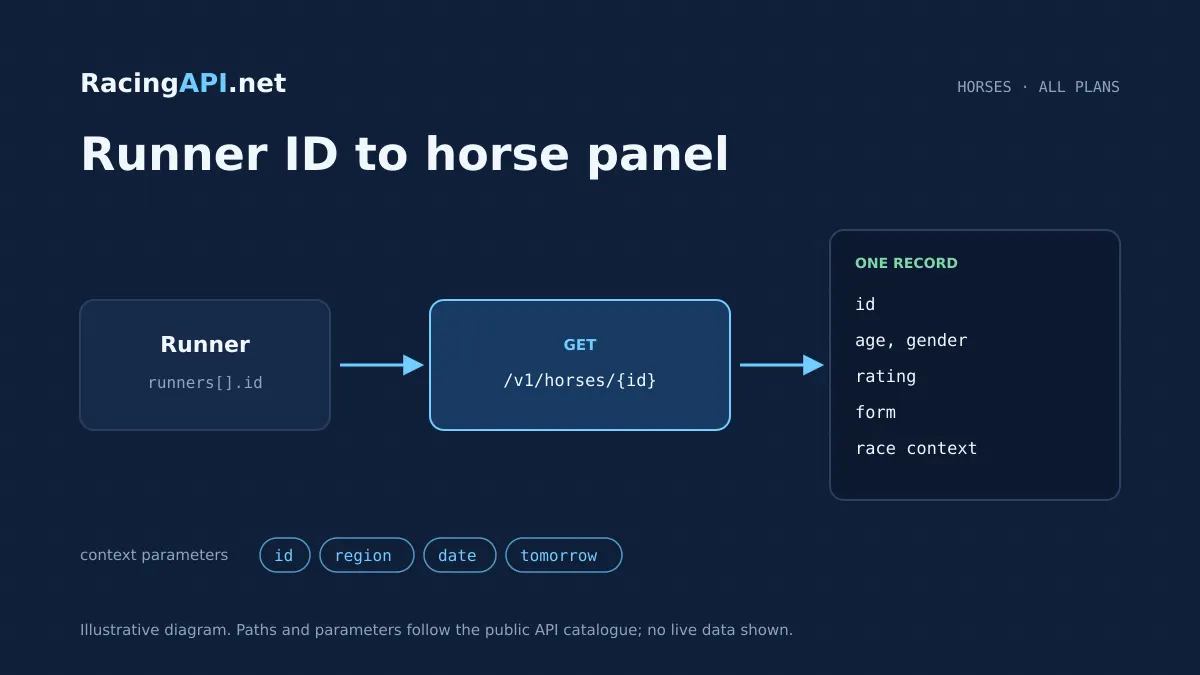
The Horse Profiles API gives you a horse panel built from a declared runner ID in the daily feed, so your product can show the right runner at the right time rather than trying to infer identity from a name. It returns the horse as represented in the selected declarations, with the profile context that belongs to that feed date: connections, supplied form statistics, available bookmaker prices, and the race-specific detail that is present for that runner. Because the source is the declared daily feed, this endpoint is designed for operational race-day products, not for reconstructing a complete biography or a universal career archive.
That makes it a strong fit for racecards, runner detail pages, shortlist views, odds comparison screens and any workflow where users drill from a race into an individual horse. The combined region is UK, which includes UK and Irish meetings under one feed; Ireland is not a separate region code. You can also request a specific date, or the documented tomorrow feed when your product needs preview content. IDs are copied from the feed itself, so integration should use those opaque IDs directly rather than matching by horse name.
What this service gives you
- Build a clean horse detail panel from declared runner IDs.
- Keep racecard drill-downs aligned to the daily feed context.
- Show connections, form context and available prices in one place.
What the horse profile actually represents
This endpoint returns the horse as it appears in the selected daily declarations. That means the profile is tied to the raceday context you have asked for, including the declared runner’s connections and the form information supplied with that feed. It is a practical panel for answering the user’s immediate question: who is this runner, how is it entered today, and what context is available for this declaration?
It is not a complete career record and should not be presented as one. The contract is explicit that the horse profile reflects the selected feed rather than a universal historical database, so the safest product approach is to frame it as a current-declaration view with related form context. Where strings are missing, they come back empty; where collections are missing, they come back as empty arrays, which makes the endpoint predictable to render in a UI without inventing placeholders.
- Built from the declared runner ID in the selected feed
- Includes supplied form statistics and available bookmaker prices
- Missing strings are empty, missing collections are empty arrays
How to use it in racecards and runner pages
A common integration is to start with the racecards feed, list the declared runners, then open this endpoint for the runner that a user selects. That gives you a clean drill-down from race-level context into horse-level detail without storing a separate profile model. Because IDs come from the feed, the recommended pattern is to persist the horse ID alongside each runner entry and pass that through unchanged.
This also works well for multiple front-end views. A compact racecard tile can show the horse name and a few headline values, while the detail drawer or full page uses the horse profile endpoint to display the fuller declaration context. If you need race-specific context as well, combine it with the Race Details API for the race itself, rather than overloading the horse endpoint with race metadata it does not own.
- Racecards feed for the list of declared runners
- Horse profile for the runner detail view
- Race details endpoint for race-level context
IDs, date selection and the UK-only region parameter
Integration starts with the path parameter: the horse ID is an opaque resource ID copied from the corresponding field in the selected daily feed. Treat it as a string and store it exactly as delivered. That avoids brittle lookup logic and keeps your system aligned with the declarations in the feed snapshot you are rendering. This is especially important when the same horse may be visible in different dated feeds or in tomorrow’s preview feed.
The query options are deliberately narrow. Only region=uk is accepted, and that single combined feed includes both UK and Irish meetings. You can also pass date in YYYY-MM-DD form to retrieve a specific day, or tomorrow=true to select the documented tomorrow feed, but those two cannot be combined. The date-based response should be treated as feed-context data for that day, not as a guarantee of continuous archive completeness.
- Use the feed ID directly; do not recreate it from the horse name
- region=uk is the only accepted region value
- date and tomorrow are mutually exclusive
Ready to call /v1/horses/{id}? All plans, one API key.
Connections, form statistics and bookmaker prices in one view
The profile is useful because it brings together the pieces a punter or trader typically wants when opening a horse. You can surface the horse’s connections, the supplied form statistics and the bookmaker prices that are available in the feed. That lets you build a practical profile panel without forcing the user to jump between separate screens for basic runner context and market context.
The prices are bookmaker prices supplied in the feed, so they should be presented as available prices rather than as a promise of universal coverage or tick-level updating. That distinction matters in product design: use the endpoint to show what the feed currently supplies, and leave live market-refresh behaviour to your own refresh strategy if you need it. The horse endpoint is a declaration view, not a market microstructure feed.
- Connections are part of the profile context
- Form statistics are supplied with the daily declaration context
- Bookmaker prices are available prices, not a coverage guarantee
How this endpoint sits alongside form, silks, jockey and trainer data
For a richer runner page, the Horse Profiles API works best as one part of a connected set of endpoints. If you need deeper form presentation, the Horse Form Statistics API is the obvious companion. If you want to show rider or stable context on the same page, the Jockey Bookings and Connections API and the Trainer Runners and Connections API let you link the horse to the people involved without forcing this endpoint to carry everything.
You can also combine it with the Horse Racing Silks API for owner colours. Those silks are PNG owner colours, not portraits, so they suit visual identification on racecards and detail pages. If your product wants to show where the runner is competing, the Racecourse Directory Feed API and Racecourse Details API can add venue context, while the Racecourse Weather API gives a separate weather forecast with attribution and expiry. That forecast is distinct from official going.
- Use the form statistics endpoint for a deeper form panel
- Use silks for owner colours as PNG assets
- Use racecourse and weather endpoints for venue context
A practical integration workflow
A typical implementation begins with authentication on your server, then a fetch from the racecards or search endpoint, and then a horse profile lookup using the copied ID. From there you can render the runner card, open a detail panel or enrich a betting workflow. Because keys stay on the customer’s server, this is a server-side integration rather than a browser-exposed one, which keeps your application structure cleaner and easier to control.
The endpoint is suitable for products that need to assemble a raceday journey: browse the card, inspect a runner, cross-check the same horse across its declared context, and then move into odds or tips if your plan includes those products. Core REST feeds are available on all active plans, so the Horse Profiles API sits within the standard product set. If your business needs saved explanations, tips or MCP tooling, those are Enterprise-only additions rather than part of this endpoint itself.
- Start with a racecard or search result, then call the horse ID
- Keep the API key server-side
- Layer on related feeds as needed for the user journey
Plan access and product boundaries
The Horse Profiles API is available on all active plans as part of the core REST feeds. Developer includes 10,000 monthly requests at 2 requests per second, Professional includes 100,000 monthly requests at 5 requests per second, and Enterprise includes unlimited monthly requests at 10 requests per second. Monthly quotas reset on the first UTC calendar day of each month, and access is activated automatically after confirmation.
Subscriptions, cards and invoices stay on-site. New eligible customers can obtain one seven-day trial after on-site checkout with a card; sign-up alone does not begin a trial, and the trial renews automatically unless cancelled. Own-product display is allowed, but resale, onward API access and account sharing are not. If you only need horse profile data, you do not need Enterprise; if you also need saved explanations or MCP access, those products sit at Enterprise level.
- Developer, Professional and Enterprise all include the core REST feeds
- Monthly quotas reset on the first UTC calendar day
- Resale, onward API access and account sharing are not permitted
Frequently asked questions
What should I pass into the {id} path parameter?
Pass the opaque horse ID exactly as it appears in the corresponding field from the selected daily feed. Treat it as a string and do not rebuild it from the horse name or from any local naming convention. That keeps your app aligned to the feed snapshot and avoids mismatches when the same horse appears in different dated contexts.
Does this endpoint give me a full horse biography or lifetime record?
No. It returns the horse as represented in the selected daily declarations, including connections, supplied form statistics and available bookmaker prices where provided. It is designed as a race-day profile view, not as a universal career-history database. If you need a broader racing journey, combine it with your own stored history or other feed-based views.
How do region and date work here?
Only region=uk is accepted, and that combined feed includes UK and Irish meetings. You can also request a specific YYYY-MM-DD date, or use tomorrow=true for the documented tomorrow feed, but those two parameters cannot be combined. The date option selects the feed snapshot you want rather than promising a complete archive.
Can I use this endpoint on its own for a racecard page?
You can, but it works best as part of a racecard flow. Most products fetch the racecard first, then call this endpoint for the selected runner’s ID to open a richer detail panel. If you also need race-level details, use the Race Details API alongside it rather than expecting the horse profile to carry every race field.
Are bookmaker prices guaranteed to be available for every horse?
No. The endpoint returns available bookmaker prices from the feed, but it does not promise universal availability or tick-by-tick updates. Product designs should treat prices as supplied data for that declaration context. If no price is present, your interface should render that absence cleanly instead of assuming a market line.
Can I use this data to power customer-facing or commercial products?
Yes, own-product display is allowed, so you can use the endpoint inside your own customer-facing application. What you cannot do is resell the API, offer onward API access, or share accounts. The API key stays on your server, and subscription, billing and invoice management remain on-site.