Single Race Tip API
Show the saved tip for one precise racecard race ID, with the matching explanation, odds and bet type.
Endpoint
GET/v1/races/{raceId}/tip
- Access
- Enterprise plan
- Coverage
- UK and Ireland
- Updated
- 1 Nov 2026
- Read
- 7 min
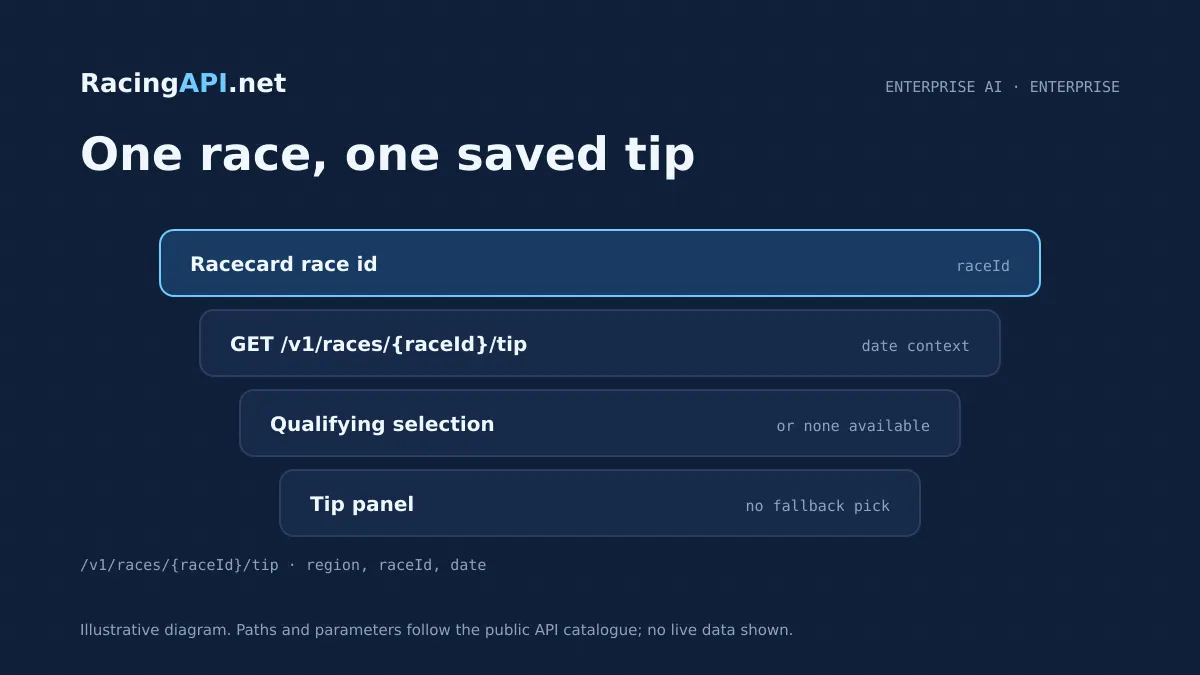
The Single Race Tip API is the simplest way to turn a racecard item into a finished tip panel. It retrieves the one saved qualifying selection for a specific race ID on the selected date, together with the saved explanation, odds and bet type, so you can present a clear tip card without re-running analysis or inventing a fallback pick. Because the endpoint is tied to the racecard ID, it fits naturally into apps that already list races, show event detail pages, or drive editorial and trading interfaces for UK and Ireland racing under the combined region=uk scope. This is a read-and-display endpoint, not a model trigger. A call to /v1/races/{raceId}/tip returns the saved result for that race and date if one exists, and it returns a non-selection status when nothing qualifies. That makes it suitable for front ends that need to read status before display, keep the user experience honest, and avoid showing a fabricated choice when there is no active tip for the race. If you already use racecards, odds, or horse form endpoints from RacingAPI.net, this service slots into the final decision layer where a single saved pick is shown in context.
For buyers, the practical value is in certainty of pairing. The race ID comes from the feed, not from name matching, so the selection belongs to a specific racecard record rather than a guessed fixture label. The endpoint is also date-aware, with the saved analysis date available in YYYY-MM-DD format and a default of today when date is omitted. That means the same integration can power live race pages, archival views for the current day, or editorial tools that need to resolve a tip against the exact saved analysis date without reprocessing the underlying model output. The payload is deliberately narrow. It is designed to expose the saved selection, saved price, bet type and the two-sentence explanation that was prepared beforehand, while preserving the status of whether the race currently has an active qualifying selection. If your product needs broader markets, racecards, results, profiles or odds comparison, those belong to the other RacingAPI.net feeds. This endpoint is for the final tip surface: one race, one saved selection, one explanation, and a response that tells you whether it is available before you show it.
What this service gives you
- Show one saved tip for one exact race without guesswork.
- Keep the explanation, odds and bet type matched to the same race ID.
- Handle missing selections cleanly instead of inventing a fallback pick.
What the Single Race Tip endpoint returns
This endpoint answers one question: what is the saved tip for this race ID on the chosen date? When a qualifying selection exists, the response is the active race analysis for that racecard ID, including the selection itself, the saved odds and the bet type. It also carries the saved two-sentence explanation, so your interface can display the reasoning exactly as prepared rather than constructing fresh copy at request time.
The contract is intentionally specific about what is and is not included. It is a single-race lookup, not a list feed, and it is separate from the broader tips endpoint that can surface multiple selections. That distinction matters when you are building a race page, because you can request just the race in view and show its tip state without loading a full card of tips or assuming every race has a recommendation.
- One race ID in, one saved tip result out
- Saved selection, odds, bet type and paired explanation
- Availability status when no qualifying selection exists
How it fits into a race page or tip panel
Many customers also use it as a status gate. Before rendering a tip block, the application reads the response and checks whether the race has an active selection for the saved analysis date. If not, the interface can hide the panel, show a neutral no-tip state or route the user to another part of the card. That keeps the presentation aligned with the saved data rather than implying a recommendation where none exists.
The endpoint is not designed for bulk browsing, so it works best when paired with the racecard feed or a race details lookup. Those services help you establish the page context; this one resolves the tip itself. That separation keeps the integration clean and helps editorial, trading and product teams maintain a clear distinction between race metadata and the saved recommendation attached to that race.
Request parameters and the date-aware lookup
A clean integration often starts by passing the racecard ID and, where appropriate, the same display date used on the page. If you are building a timetable, race list or saved article view, the date parameter helps you keep the displayed tip in step with the card the user is actually viewing. That matters because the endpoint returns saved analysis rather than live re-analysis, so the date defines which saved record you are asking for.
When no qualifying selection is available, the response lets you detect that state instead of falling back to a fabricated tip. That makes the endpoint suitable for workflows that must distinguish between a valid saved selection, a race with no active recommendation and a race that is out of scope. In other words, the parameters help you request the correct record, and the response tells you whether there is anything safe to show.
Ready to call /v1/races/{raceId}/tip? Enterprise plan, one API key.
A practical integration workflow
If you already show bookmaker prices, the tip panel can be placed beside the latest odds snapshot without implying that the API is sourcing every market price in real time. The odds in this endpoint are the saved odds attached to the selection, while the dedicated odds feed is where you go for broader bookmaker price data. That separation is helpful when building pages that need both a recommendation and a market view, because each service retains its own role.
The best implementation pattern is to treat this endpoint as a final presentation lookup, not as a predictive engine call. Your app supplies the race ID, checks the returned status and then renders the tip only when the selection is present. That approach keeps the user journey fast to understand and protects you from showing a tip where the service has none to provide for that specific race/date combination.
Data scope, content rules and what the service is not
It is also worth separating this service from the broader tips and explanations products. The single race endpoint is about one precise racecard record, whereas the multi-race tips feed is built for lists. The explanation is prewritten and exactly two sentences long, and it remains paired with the selection version that was saved beforehand. That pairing is part of the integrity of the response, so the client should preserve it rather than rewriting the wording in the browser.
For betting-style displays, the endpoint reflects saved odds and the bet type attached to the selection. It is not a promise of universal market availability, and it is not a guarantee of live, tick-level movement. That is why many teams pair it with the odds feed for a broader market view, while keeping this endpoint for the official saved tip message that belongs to the race itself.
Display and editing choices for commercial products
For internal tools, the endpoint can power quality checks. Support staff, traders or editors can open a race ID, verify that the saved selection is the one intended for that date, and confirm that the paired explanation and bet type match the published presentation. Because IDs come from the feed, the workflow is reliable even when race names repeat across meetings or days.
If you are assembling a dashboard, this endpoint also works well as a detail drawer. A list of races can show a simple status indicator, and clicking one race can fetch the tip payload on demand. That keeps the page compact while still allowing a full explanation when a supported selection exists. It is a better fit than trying to preload a card of tips where only one race is relevant to the user’s current view.
Access, plans and how the endpoint is delivered
The practical plan choice depends on traffic and how many race pages you expect to resolve. Developer includes 10,000 monthly requests at 2 requests per second for £29/month, Professional includes 100,000 monthly requests at 5 requests per second for £79/month, and Enterprise is £99.99/month with unlimited monthly requests at 10 requests per second. No VAT is added. Those limits matter most when you are deciding how often your UI will call the race tip lookup during a racecard session.
Because the endpoint is read-only and already saved, it fits cleanly into production front ends and editorial tools. It is also compatible with the wider RacingAPI.net suite, so you can combine it with racecards, results, odds, race details, horse profiles and other race-specific feeds to build a fuller page. The tip endpoint simply gives you the final saved recommendation for the one race the user is looking at.
Frequently asked questions
What does the Single Race Tip API return for one race ID?
It returns the saved qualifying selection for that specific racecard ID on the chosen analysis date, together with the saved odds, bet type and two-sentence explanation. If there is no qualifying selection for that race/date, the response shows that status instead of inventing a replacement tip. That makes it suitable for a panel that only appears when the saved recommendation exists.
Do I need to match race names myself?
No. The endpoint is built around the race ID from the feed, not a name-based match, which is important when meetings include similar or repeated race titles. In a real integration you would usually take the race ID from a racecard or race details response, then call /v1/races/{raceId}/tip for the exact record you want to display.
Does requesting this endpoint create a fresh tip or explanation?
No. The endpoint reads the saved tip for that race and date; it does not generate a new analysis on demand. The saved explanation is already prepared beforehand and remains paired with the selection version that was stored, so the response is intended for display and validation rather than live model generation.
How should I handle races with no active selection?
Treat that response as a real state, not as an error to patch over with a synthetic pick. Your UI can hide the tip panel, show a neutral no-tip message or leave the slot empty, depending on the design. The important point is to show only supported selections and not fabricate a fallback recommendation when none exists.
What is the difference between this endpoint and the broader tips feed?
This endpoint is a single-race lookup for one precise race ID, whereas the broader tips feed is for list-style access across multiple selections. If your page is centred on one racecard item, this service is the right fit because it returns the saved tip state for that exact race, including the explanation and bet type, without forcing you to browse a list.
Can I use it on public pages or in internal tools?
Yes, provided you stay within the plan and access terms. It is useful on public race pages, subscriber-facing tip panels and internal editorial dashboards because it returns a clear saved state for one race. Keys stay on the customer’s server, subscriptions are managed on-site, and the service is intended for your own product display rather than onward API resale or account sharing.