Horse Racing Results API
Build a results centre from published finishers and link each race straight into your archive workflow.
Endpoint
GET/v1/results
- Access
- All plans
- Coverage
- UK and Ireland
- Updated
- 1 Nov 2026
- Read
- 6 min
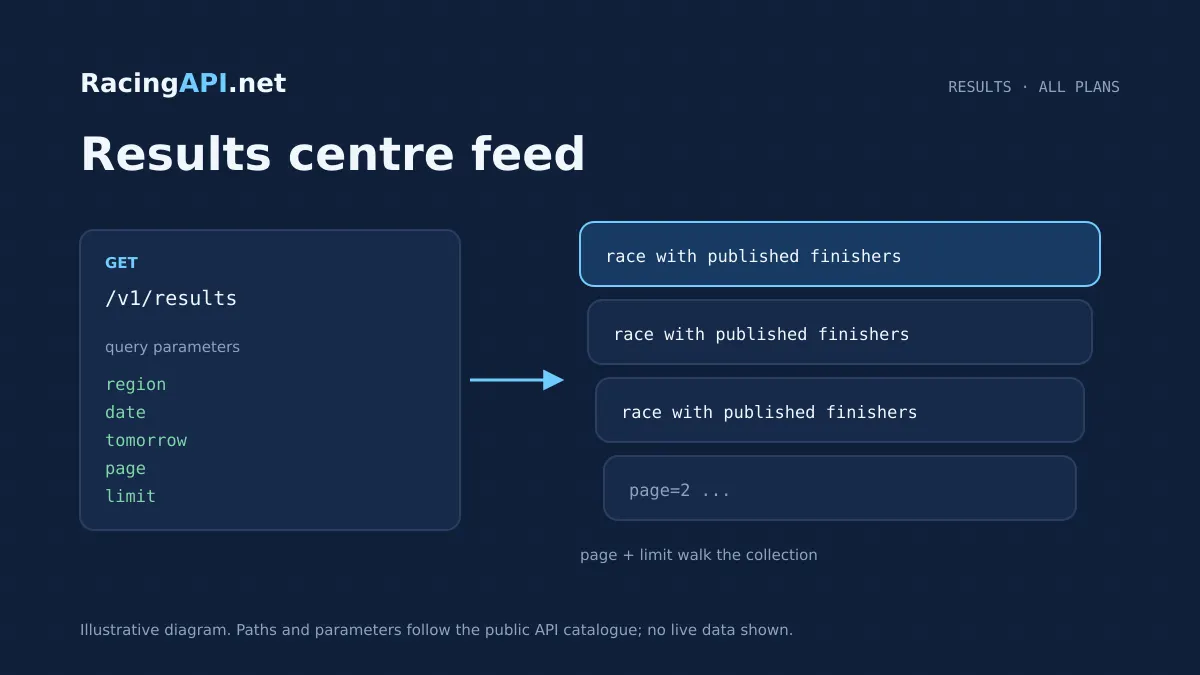
The Horse Racing Results API gives you a practical way to surface races only after published finishers exist in the feed. It is designed for products that need a results archive rather than a prediction layer: a daily list of completed meetings, source-supplied wagers where present, and the IDs you need to move from a calendar view into a race-level results record. Because the feed is combined for UK and Ireland under region=uk, you can build one results experience for both markets without splitting the integration into separate regional products.
That makes the endpoint a strong fit for results pages, archive navigation, daily settlement screens and post-race content workflows. You can ask for a specific calendar day, choose the documented tomorrow feed, or page through the list to build a browsable archive. An empty response means there were no published results in the selected feed, not that the service failed. The endpoint sits within RacingAPI.net as part of the live product suite, so it is meant to be integrated directly into your application rather than used as a standalone lookup widget.
What this service gives you
- Show only completed races with published finishers
- Build archive navigation around real feed IDs
- Use one combined UK and Ireland results feed
- Keep list browsing and single-race lookup separate
- Support date-based archives and tomorrow views
What this results list actually returns
This endpoint lists races that have non-empty finishers in the selected feed. It is not a predictive finish-order service and it does not return speculative outcomes. If a race appears here, it means the feed has published results for that race day and there is something meaningful to show in your archive, settlement page or post-event content flow. Where the source provides wagers, those are included with the list item.
The list is built around race records, not runner-level pagination. Each race item includes its nested runners, so one request can support a page of completed races without forcing you to call a separate endpoint for every runner. If you need the detailed record for a single race, the natural follow-up is the individual result endpoint at /v1/results/{raceId}, using the race ID supplied in the list response.
- Published finishers only
- Race-level list with nested runners
- Source-supplied wagers where present
- Race IDs are the link into the detailed result record
Choosing the day you want to show
The primary control for this endpoint is date. You can request a specific calendar day in YYYY-MM-DD format and build a results archive page that matches the user’s chosen date. There is also a documented tomorrow feed, which is separate from date and cannot be combined with it. That gives you a clean way to support forward-looking pages where your product needs to pre-load the next day’s feed context.
Historical depth is available in the combined UK and Ireland archive, with explicit UK archive dates sampled back to 2016. That is useful for archive browsing, but it should be treated as a feed-based history rather than a promise that every date is complete. In practice, this means your interface should handle sparse or empty days gracefully and present the selected date as the user’s chosen feed view, not as a guaranteed full historical dataset.
- Use date for a specific archive day
- Use tomorrow for the documented next-day feed
- Do not combine tomorrow with date
- Historical completeness is feed-dependent
Joining list results to the detailed record
The real value of this endpoint is in the ID flow. IDs come from the feed, not from name matching, so you can build a reliable join between the race list and your detailed result pages. The list gives you the race identifier, and that same ID can be passed into /v1/results/{raceId} when you need the full race result record. This avoids brittle matching on race names, courses or meeting labels.
For product teams, that means less reconciliation logic and fewer edge cases when a day contains multiple similar race names or changing presentation labels. The list endpoint is ideal for discovery and navigation, while the single-race result endpoint is the record you open after the user clicks through. In other words, /v1/results helps people find the right result, and /v1/results/{raceId} shows them the detailed page they expected to open.
- Feed IDs are the join key
- Use the list for discovery
- Use the single result endpoint for detail
- Avoid name-based matching in your own code
Practical ways buyers use the feed
Many customers use this endpoint to power a results centre with filters for date, a compact list of completed races, and click-through detail pages. Others use it as a settlement back-end for internal teams who need to confirm what has finished on a given day before publishing summaries, reconciliation notes or historical browsing tools. Because the feed only shows races with published finishers, it keeps the UI focused on completed events rather than live racecard content.
If you are building a newsroom or content workflow, the endpoint can act as the trigger for post-race updates. Editors can open the selected day, find the race IDs, and use those IDs to pull the richer result record for each race. That supports a structured editorial process without relying on manual copying from a page or on users searching by race title alone.
- Public results centre
- Internal settlement and reconciliation tools
- Editorial post-race workflows
- Archive search and click-through detail pages
What the feed covers, and what it does not
This is a daily-feed results view, so the surrounding profile and statistics context elsewhere in the platform should be understood in the same daily-feed way. The endpoint is for published race results, not a universal lifetime archive of every horse, jockey or trainer record. If your product needs deep profile context, that belongs in the relevant profile or form endpoints rather than here. The results feed is about what has been published for the selected day.
Where source-supplied wagers exist, they are part of the list response, which can be useful for results presentation and summary pages. The endpoint does not invent or infer data that is not in the feed. If a day has no published results, the correct state is an empty list. That behaviour is useful in production because it lets your app distinguish between no results and no response, instead of treating a quiet day as an error.
- Daily-feed context, not a universal history database
- Source data only; no inferred results
- Empty list means no published results
- Use other endpoints for deeper profile history
How to integrate it cleanly into a product
A straightforward implementation begins with authentication on your server, where your API key stays under your control. Your application then requests /v1/results with region=uk and either a date or tomorrow, depending on the page you are building. From there, you render the list, store or cache the race IDs as needed, and route users into /v1/results/{raceId} for deeper detail. Because the list and single-record lookup are distinct products, the workflow stays simple and predictable.
In a typical front end, you would expose a date selector, a pagination control and a results table or card list. On the back end, you would validate the selected day, manage request volume against your plan limits and handle empty responses as a normal state. If you are building a larger archive, keep the selected date in the URL so pages can be shared and revisited without confusion. That gives you a clean, commercial results feature rather than a one-off API demo.
- Server-side key handling
- Date or tomorrow selection
- Separate list and detail requests
- URL-friendly archive pages
Frequently asked questions
What does an empty response from /v1/results mean?
An empty list means there were no published results in the selected feed for that request, not that the endpoint failed. That distinction is useful for archive pages and scheduled jobs, because your application can show a proper no-results state instead of raising an error. If you were expecting a result, you can still check the date selection, pagination and region value before retrying.
Can I use region values other than uk?
No. The endpoint accepts only region=uk. That combined feed includes UK and Irish meetings, so Ireland is not exposed as a separate region code here. If your product needs another regional dataset, that is outside this endpoint’s customer-facing scope.
How do I open the detailed result for one race?
Use the race ID returned by the list endpoint and pass it into /v1/results/{raceId}. IDs come from the feed, so you should not rely on name matching to find the record again. This makes the workflow more reliable when a day contains similar race names or repeated venue labels.
Is tomorrow the same as using a date value for the next day?
No. tomorrow is a separate documented selector and cannot be combined with date. Use date when you want a specific calendar archive day, and use tomorrow when you want the next-day feed view defined by the product. Keeping them separate helps the interface remain clear to users and simpler to validate in code.
Do runners paginate separately from races?
No. The list is paginated at race level, and each race item includes its nested runners. That means one page gives you a slice of completed races rather than a separate runner table. If you need one race in full, use the single result endpoint for that race ID.
Can I treat this as a universal historical results database?
No. The feed includes explicit UK archive dates sampled back to 2016, but that does not guarantee every date is complete. It is best used as a feed-based archive for published finishers, with your UI designed to handle missing or empty days sensibly. For deeper historical or profile context, use the relevant specialised endpoints in the RacingAPI.net suite.