Racecourse Weather API
Add racecourse-level weather forecasts to your racing product with cached, coordinate-based data for UK and Ireland meetings.
Endpoint
GET/v1/racecourses/{id}/weather
- Access
- All plans
- Coverage
- UK and Ireland
- Updated
- 1 Nov 2026
- Read
- 6 min
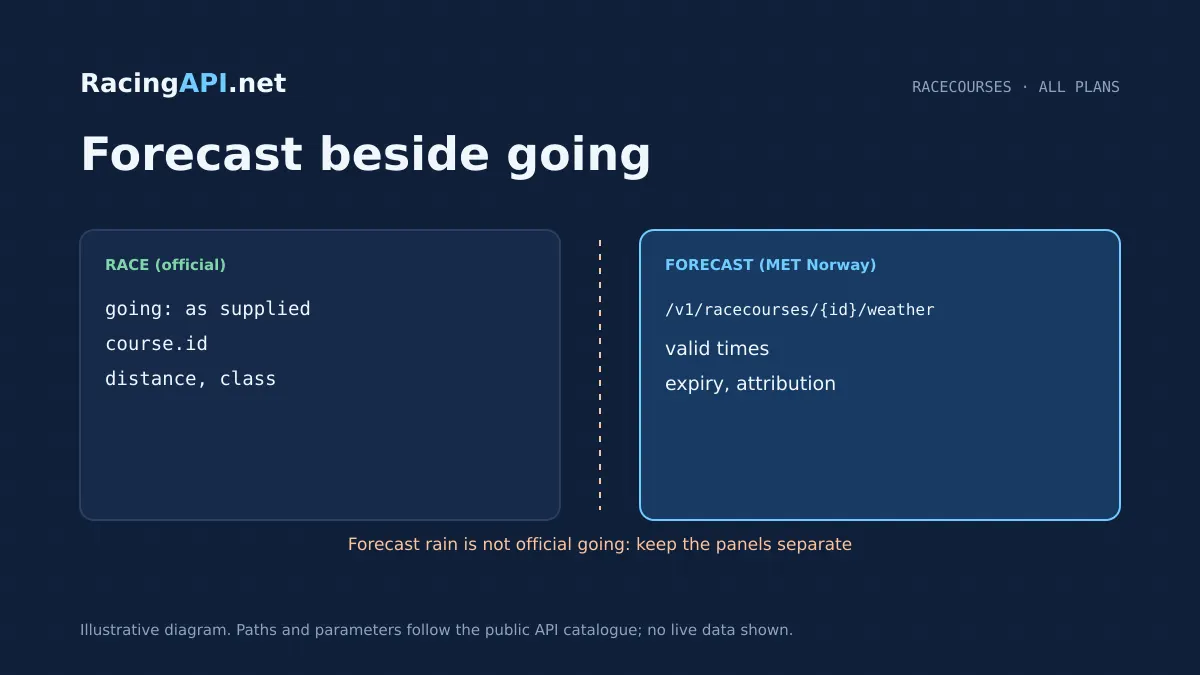
RacingAPI.net’s Racecourse Weather API gives you weather forecasts for the venue behind a racecard, race detail page, or course directory record. It is built for products that need to show the likely conditions around a meeting without pretending to be an on-track sensor feed or an official going update. You pass the racecourse ID from the daily racing feed, choose the UK and Ireland combined region, and receive the latest available forecast mapped to verified racecourse coordinates.
The response is designed for practical display and reuse. Times are returned in UTC, the forecast array is not paginated, and the data includes metadata for expiry and source attribution so you can cache it responsibly and keep your interface honest. Because this endpoint is tied to the selected racing feed, it belongs in workflows where date selection matters: today’s feed, tomorrow’s feed, or a saved archive date can each point to a different course record, while the weather itself is forecast data rather than historical weather history.
What this service gives you
- Venue-level weather for UK and Ireland racecourses in one feed.
- Cacheable forecast data with expiry metadata and source attribution.
- Easy to add alongside existing racecards, race details and course pages.
Forecasts tied to the racecourse record you already use
This endpoint is for venue weather, not a generic city forecast. You provide the opaque racecourse ID copied from the relevant daily feed record, and RacingAPI.net returns the latest available forecast for that course’s verified coordinates. That makes it suitable for racecards, meeting pages and operational dashboards where the user is looking at a specific track rather than a broad regional area. The key point is identity: IDs come from the feed, not from name matching, which keeps the integration deterministic.
The service is available on every plan with normal API-key authentication and account limits, so it fits straightforward product builds as well as higher-volume commercial deployments. It covers the combined UK and Ireland region under region=uk only. If your product already pulls racecards or racecourse details, the weather endpoint slots into the same object model and lets you enrich a venue page with forecast context without building a separate mapping layer for course names or regions.
A simple request flow that respects the selected racing feed
The integration starts with choosing the correct source feed for the day. The contract allows date or tomorrow to select the racing feed used to find the course; those parameters do not request historical weather, and they cannot be used together. In practice, that means your app first loads the racecard or racecourse record for the meeting you want to show, then copies the course id into /v1/racecourses/{id}/weather. This keeps the weather aligned with the race session your user is viewing.
For most products, the page flow is simple: load the meeting, render the card or race details, then request the forecast in the background and merge the result into a weather panel. Because the forecast array is not paginated, you can treat the response as a single compact payload rather than designing a multi-page fetch sequence. That makes it well suited to browser dashboards, server-side rendered pages, mobile apps and internal racing tools that need a low-friction weather add-on.
How to interpret times, rainfall and missing values
Forecast times are returned in UTC, and they are usually hourly at the start of the period before becoming more widely spaced later on. That matters if you are matching a race start to a weather point: use a forecast only within its stated time horizon, rather than assuming that the nearest record after midnight or before the off is always appropriate. RacingAPI.net does not manufacture extra interpolation beyond what the feed provides, so the safest approach is to present the latest forecast time alongside the meeting time and let the user judge relevance.
Rainfall is described as precipitation for the period after the forecast time, using precipitationPeriodHours. That wording is important for front-end labels, because it is not the same as an instantaneous rain gauge reading. Where a field is unavailable, it is null rather than zero, so your application should preserve nulls as unknown values instead of turning them into dry weather. This keeps charts, summaries and alerts accurate when a particular forecast element is not supplied.
Ready to call /v1/racecourses/{id}/weather? All plans, one API key.
Cache weather until the expiry metadata tells you to refresh
The endpoint includes meta.expiresAt, which is the practical signal for cache reuse. If you are building a public-facing page or a staff tool, this lets you store the forecast response and reuse it until the documented expiry, rather than making a new request every time the page is opened. That is useful for reducing duplicate calls and for keeping race-day screens stable while the forecast remains valid. The service also notes source refresh and availability are not guaranteed, so your cache logic should be expiry-led rather than assumed continuous polling.
You should also preserve meta.source attribution and any licence links when displaying the weather. That is not just a legal detail; it helps users understand where the forecast came from and keeps your product transparent when conditions change. A sensible implementation is to store the raw response, extract the display fields you need, and render a short attribution line in the weather module or footer. If the source cannot be refreshed at a given moment, your cached forecast can still serve the page until expiry.
Useful product features you can ship with this endpoint
An operator can use this endpoint to add a weather strip to a live racecard page, showing forecast direction, temperature-related values and rain context next to the race list. A betting product can use it to support smarter meeting views, where a user can see whether a course is likely to be dry or unsettled before they open race details. A media app can add weather context to commentary or previews without confusing forecast weather with official going. The point is to support interpretation, not to replace the track’s formal status.
For internal teams, the same endpoint can sit inside an editor, CRM or trading console. You might use it to flag meetings where weather context deserves manual review, or to help content staff write venue notes for the day. Because the data is racecourse-specific and keyed from the same daily feed as your racecards, it integrates cleanly into existing race flow: course lookup, weather fetch, display, cache, and refresh when the expiry metadata says to do so.
Know exactly what this weather service does not replace
This endpoint returns forecast weather at verified venue coordinates; it does not provide official going, live radar, or on-track observation. That distinction is important for any racing product that needs to separate forecast conditions from the official state of the course. A user may see predicted rain in the forecast while the official going remains unchanged, so your interface should label the module clearly as weather rather than course condition. The feed is useful context, not a substitute for racecourse reporting.
The service is also not a general weather archive. You can select a racing feed date, but that choice is about which racecourse record to use from the daily feed, not a promise of complete historical weather coverage. Likewise, the endpoint does not guarantee hyperlocal conditions for every part of the track. It is a venue-level forecast mapped to coordinates, which is exactly what makes it suitable for racecourse pages, while still leaving room for local variation that a forecast cannot honestly remove.
A clean way to integrate it into your RacingAPI.net stack
The most robust workflow is to keep the course ID alongside the racecard or race details record that supplied it, then call the weather endpoint from that same object when the user opens the venue view. This avoids unnecessary name lookup and makes the request path predictable. Because the combined region is always uk for this endpoint, you do not need to branch between separate UK and Ireland weather calls. A single integration path can therefore cover both sets of meetings in one interface.
Your presentation layer should also respect the forecast horizon. If a race starts outside the valid window of a given forecast point, do not force a match that the data does not support. Instead, show the nearest valid forecast within range, and make the timing visible. That approach works well in racecards, scheduled previews, weather widgets and management dashboards alike. It produces a more trustworthy product, and it keeps your use of RacingAPI.net aligned with the feed’s actual scope.
Frequently asked questions
How do I get the racecourse id for this weather endpoint?
Use the opaque course ID from the selected daily feed, such as racecards course.id or the racecourses feed. Do not try to match by venue name, because the contract is explicit that IDs come from the feed and should be treated as strings. Once you have the ID, pass it directly into /v1/racecourses/{id}/weather.
Does region=uk really cover both the UK and Ireland?
Yes. For this endpoint, region=uk is the only accepted region parameter and it represents the combined UK and Ireland racing feed. There is no separate Ireland region code for customer use here, so you do not need to make a second regional request for Irish meetings.
Can I use date or tomorrow to ask for historical weather?
No. Those parameters choose which racing feed is used to identify the course, not a historical weather archive. They are there to align the weather request with the relevant meeting date or the documented tomorrow feed. Continuous archive completeness is not guaranteed, so this should not be treated as a general weather history service.
How should I display the forecast times?
The contract states that forecast times are returned in UTC, with hourly spacing usually at the start and wider spacing later. You should present the times clearly and only match a race time to a forecast that is within its time horizon. That avoids implying a level of precision the data does not provide.
What does precipitationPeriodHours tell me?
It describes rainfall for the period after the forecast time, not a live rain reading at that instant. This is useful when you want to show expected precipitation in a weather panel or annotate a meeting preview. If the value is missing, it will be null rather than zero, so your UI should preserve that distinction.
Can I cache the response on my own site?
Yes, and the response is designed for that. Use meta.expiresAt as your cache boundary, and keep the meta.source attribution and any licence links when displaying the forecast. The contract also notes that source refresh and availability are not guaranteed, so cache-aware reuse is the right approach for stable presentation.