Trainer Runners and Connections API
Show a trainer’s declared runners in the daily feed, with race links and horse-specific connections ready to use in your app or workflow.
Endpoint
GET/v1/trainers/{id}
- Access
- All plans
- Coverage
- UK and Ireland
- Updated
- 1 Nov 2026
- Read
- 6 min
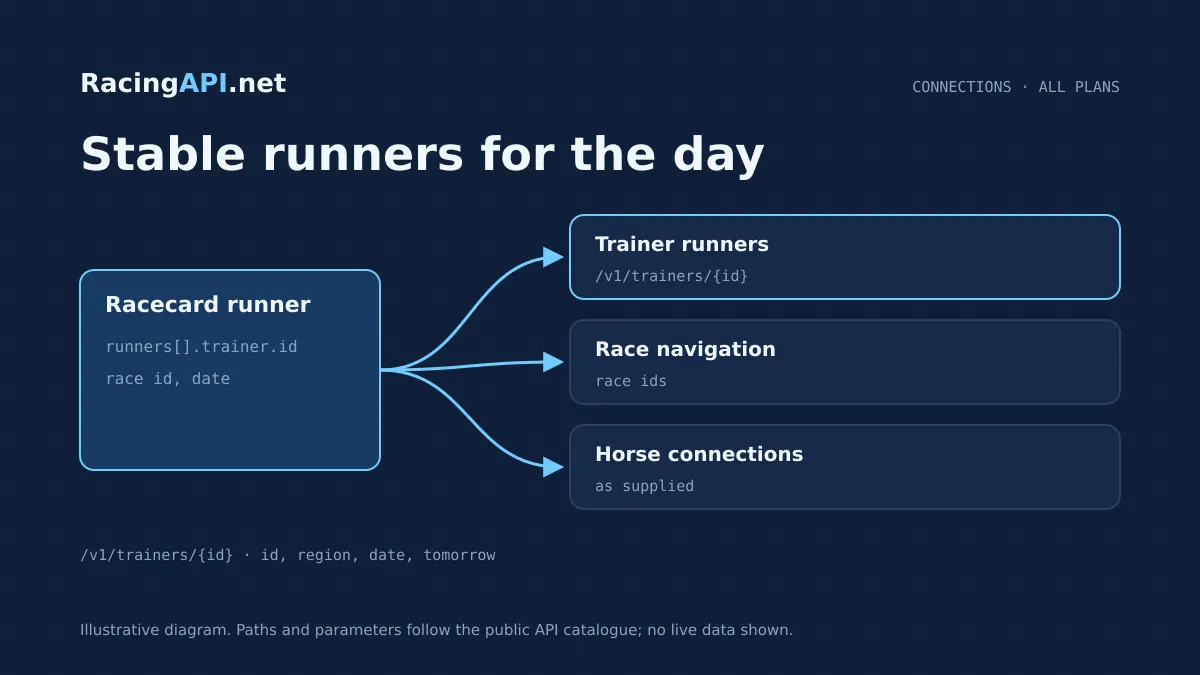
The Trainer Runners and Connections API is the RacingAPI.net endpoint for turning a trainer page into a practical daily runner view. It tells you which horses are declared for a specific trainer in the selected UK and Ireland feed, using the trainer’s opaque feed ID rather than any name matching. Each bookings item includes the horse, the race ID and the horse-specific connections form so you can move from stable context into race navigation without stitching together separate datasets.
This is a feed-driven service, not a career-history product. The data reflects the selected daily context, so it is best used for today’s declarations, tomorrow’s planned cards, or a chosen feed date. That makes it well suited to stable-yard dashboards, race-day operations, editorial tools and internal research screens where the question is “which runners are in for this trainer now?” rather than “what is the trainer’s complete archive?”.
What this service gives you
- Daily trainer runner lists tied to real race IDs
- Cleaner stable-focused navigation than a generic profile page
- Simple integration into racecards, dashboards and internal tools
What the endpoint returns
A successful request returns the trainer’s bookings for the chosen feed context. The service is named around trainers, but the field itself is bookings for consistency with the rest of the platform. Each item ties one declared horse to its race ID and the horse-specific connections form, giving you the ingredients needed to build a stable runner list, a race planner or a trainer-centric card view without inventing any extra interpretation.
Because IDs come from the feed, your integration should store and pass the trainer ID exactly as supplied by RacingAPI.net. That matters when you are linking from racecards, horse search or a prior trainer list into this endpoint. It also keeps your application aligned with the same record identity across daily data, rather than relying on a display name that may be ambiguous or formatted differently.
- Daily trainer bookings in the selected feed
- Horse-specific connections form for each declared runner
- Race ID for direct navigation into race detail views
Daily feed context, not a career database
This endpoint is designed around the selected daily feed for the combined UK and Ireland region. You can request the current feed, a specific date using YYYY-MM-DD, or the documented tomorrow feed. The region parameter accepts only uk, which covers the combined regional scope; there is no separate Ireland region code to switch on. If you are building an app that schedules ahead, that date selection is the clean way to preserve context.
The data should be treated as what is declared in that feed, not as a universal, complete trainer history. That distinction is important for front-end wording and for your own logic. For example, a trainer card can show “declared runners” rather than “all runners ever”, and a race navigation component can offer a feed-date snapshot instead of promising uninterrupted archive coverage across every day in the past.
- Use current, dated or tomorrow feed context
- Region is combined UK and Ireland via region=uk
- Do not treat the response as a full career archive
How to integrate it into your product
The response is also suitable as a joining point for other RacingAPI.net services. A race ID from the trainer bookings can be sent on to race details or racecards, while the horse itself can be linked to horse profile or form endpoints if your workflow needs deeper context. That lets you build one clear drill-down path from trainer to runner to race, instead of forcing users to move through disconnected screens.
On the operational side, keep your request handling simple. Honour the platform’s rate limits for the active plan, handle 404s when a trainer is not present in the selected feed, and separate 401/403 access failures from 422 validation issues such as invalid date combinations. That gives your application predictable behaviour when users swap between today, tomorrow and a stored feed date.
- Get the trainer ID from a feed or search result, then reuse it exactly
- Store feed date with the ID if you need repeatable saved views
- Chain race IDs into race details and horse links into profile pages
Ready to call /v1/trainers/{id}? All plans, one API key.
How trainer bookings differ from jockey bookings
The horse-specific connections form can help you present the trainer view with more context, but it does not turn this service into a leaderboard or form guide. It is still a declaration-led daily feed endpoint. If your product needs wider statistics, pair it with the relevant horse or trainer form-related services rather than assuming the runner list itself contains historic performance depth.
This distinction also improves your internal data model. Use the trainer endpoint for stable context, the jockey endpoint for ride context, and race details for event context. Then your front end can show the same race in three ways: by trainer, by jockey or by racecard. That makes the product more flexible without copying the same information into inconsistent labels.
- Trainer bookings = declared runners for a yard
- Jockey bookings = rides for a rider
- Use each endpoint for its own user question
Useful interface patterns for buyers
For back-office use, many teams prefer an exportable table. Since this endpoint is grounded in the daily feed, it can be cached for a session or rendered into a worklist for editorial planning, race previews or internal briefing notes. The important point is to keep the source ID visible in the system, even if the end user only sees the trainer name, so subsequent refreshes still resolve to the same record.
If you already use RacingAPI.net racecards or horse pages, the trainer bookings can become a contextual widget rather than a separate destination. That helps you reduce duplicate navigation and keeps the trainer’s runners in the same environment as the race they are entered in. The result is a cleaner product flow and a better match for live daily usage than a static profile page would offer.
- Trainer dashboard with runner list and race links
- Race-first views showing which trainers are involved
- Exportable operational lists for editorial or research use
What is and is not in scope
The same discipline applies to related assets. Silks are PNG owner colours rather than portraits, and weather forecasts from the racecourse weather service are separate from official going. Those distinctions matter because they help your product remain accurate: the trainer endpoint gives you declarations and connections, not decorative extras or weather assumptions that belong elsewhere in the data model.
If you are building a customer-facing screen, it is usually best to state the scope plainly. Terms such as “declared runners”, “feed date” and “connections” are more accurate than “complete record” or “all-time history”. That way, users understand why the page changes with date selection and why a trainer may have different bookings depending on whether they are viewing today or tomorrow.
- Daily declarations and horse connections only
- Not a full trainer career or statistics archive
- Combine with other endpoints when deeper context is needed
Access, plans and practical usage
The endpoint is intended for your own product display and internal workflows, not for resale, onward API access or account sharing. That matters if you are embedding trainer data in a customer portal, because the commercial model supports normal product usage while still protecting the account boundary. If your business needs higher throughput, the plan ladder gives you a clear upgrade path without changing the endpoint contract.
For development, the practical approach is to test the connection, verify the trainer ID mapping, and then wire the same call into your chosen screen or service layer. Since access is automatic after confirmation, teams can move from purchase to integration quickly, but it is still worth validating the request flow with the date and region options that your live product will actually use.
- Core REST feed included on all active plans
- Keys remain on the customer’s server
- Trials, subscriptions and invoices are managed on-site
Frequently asked questions
What is the Trainer Runners and Connections API used for?
It is used to show the declared runners for a specific trainer in the selected UK and Ireland daily feed. Each booking links the horse to a race ID and includes the horse-specific connections form, so you can build stable pages, runner lists and race navigation screens. It is designed for live or dated feed context rather than long-form career history.
How do I choose the right trainer ID?
Use the opaque ID supplied by the feed and pass it back exactly as a string. Do not try to recreate the ID from the trainer’s name, because the contract is explicit that IDs come from the feed. In practice, you will usually collect the ID from a racecard, search result or another linked daily feed view, then reuse it in this endpoint.
Can I use region values other than uk?
No. The only accepted region value is uk, and that combined feed includes UK and Irish meetings together. There is no separate Ireland region code for customer access, and other regional feeds are excluded. If your application lets users choose region, this endpoint should only present the single combined option.
What is the difference between date and tomorrow?
date lets you request a specific YYYY-MM-DD feed, while tomorrow selects the documented tomorrow feed. You cannot combine them in the same call. This is useful if your product needs to show current declarations, a planned future card, or a saved feed date for repeat viewing.
Is this endpoint a trainer statistics service?
No. It is a daily declarations and connections endpoint, not a trainer career statistics database. The response is meant to show which horses are booked in for that trainer in the selected feed context. If you need broader form or horse-level history, combine it with other RacingAPI.net services built for those purposes.
How should I handle the bookings field if I already use the jockey endpoint?
Treat the field name as shared but the meaning as endpoint-specific. In the trainer endpoint, bookings are the trainer’s declared runners; in the jockey endpoint, bookings are rides. Keeping them separate in your labels, filters and database mappings will prevent confusion and give users a clearer view of stable context versus rider context.